This is a guide designed to be as quick and effective as possible.
Dwarf Fortress is a sandbox game simulating a randomly generated world in every detail, from geography to populations and myths. It offers four modes of play, but the one explained will be the first. You will lead an expedition of dwarfs and build their fortress along the years, starting from setting farms and bedrooms, up to the military aspect to deal with sieges of epic proportions. In short it’s a city-building kind of game blended with The Sims and Dungeon Keeper. There’s a bit of everything, but in the beginning you’ll just try to make your dwarfs survive the first winter while you start to dig your wannabe Ironforge.
Yes, it’s an ASCII game, but it’s more easily playable than how it appears.
1- You don’t need to memorize commands as everything is accessible through on-screen menus.
2- The ASCII is a graphical representation. It just needs time to get used, and then it will be as readable as any graphical game.
(click to read the rest)
To begin with you “Create New World” from the start menu. No world will be the same as it’s all generated, so your world, and then fortress, will be like that little snowflake. Something unique and unrepeatable. That’s part of the charm. The creation is automatic, so you just press [Enter] and then either stare or go browse the wiki while you wait. It will take some minutes, depending on your hardware processing power. Once it’s done you’ll see a line at the bottom of the screen asking you to press [Enter] to continue or [p] to export an ASCII map (it will be in the main folder). If you want the map of your full world do it now because you may not be able to get it later.
There’s a new feature to transform that ASCII map into something more graphical. I mention this because if you don’t extract it now, you won’t be able to do it later. So if you want to see your generated world as a weirdly colored fractal you select “Start Playing” from the start menu and then “Legends”. Then press [d] for a detailed map, and make sure you have some space on the HD because it can take about 50Mb alone.
Then go back and select “Dwarf Fortress” so that the journey can begin. Next you have to select where in the world your settlement will arise (or be carved). It’s probably THE most important choice because the difficulty of the survival will depend greatly on the location. You’ll see three graphical windows working like three zoom levels. The rightmost is a very abstract representation of the whole world. With arrow keys you move around (if you have the detailed .bmp map created before you should be able to easily recognize the location on the “region” window), with [Tab] you cycle through various information screens. To pick a location I’d suggest the source of a stream. Three resources will be useful: water, trees and a mountain face to dig. The mountain less so, as with the game’s new version you can just dig downward. So you can ideally build an underground fortress in a plain. Try to pick a temperate climate so that the winter won’t be terrible, a decent amount of trees and vegetation, and calm surroundings if you don’t want to suffer a painful death, like stomped by phantom elephant. With function keys (when displayed in the bottom right) you can cycle through biomes. The small box you see in the “Local” window will become your explorable area. You can read on screen the keys to press to move and expand that box. The bigger it is, the bigger will be the area where you’ll manage your dwarfs. So go around searching a good location with the necessary resources (trees and water, mostly). The biomes give you informations on the different types of environment. Remember that at this moment your dwarf expedition will appear at the center of the selection box, and not in the selected biome, so it can happen that you are visualizing a biome with plenty of trees and vegetation, and then discover while in the game that your dwarfs have appeared on top of a mountain with the trees at the bottom level, almost inaccessible. So choose the location carefully and then [e]mbark.
You can now start the game with a default expedition, or organizing things yourself. I suggest the latter so that you have a better idea of what you’ll have available. So Press [Space]. With [Tab] you cycle between two modes: dawrfs and inventory. In the dwarf screen the up/down keys will cycle through the seven dwarfs, while left/right keys move to the other column (that will scroll). Here you can basically buy skills. You can’t have everything as you only have 200 points to “spend” on both skills and inventory (lower right). It’s also not an ultimate choice as every dwarf can learn any job at any time, he just won’t be skilled at it. A good idea can be about having a miner/mason/engraver/mechanic, a carpenter/woodcutter/building designer and an ambusher/axedwarf that will become your hunter. With the remaining four dwarfs you can decide how to split jobs, trying to get at least these: fisherman, grower, cooker, brewer, herbalist and butcher. You’ll learn how to make optimal builds and I think it should stay outside the scope of a guide as it’s a freeform choice depending on your style of play and preference. As I said it’s less important than you think as you can tweak jobs anytime while playing. So once you have some basic professions, you are set.
—
Part 2
The other screen is the inventory. On the left you see what you already have in the inventory (by default). I wouldn’t change much. I use to bring two dogs and cats. Dogs will be your first soldiers against some early threats, while cats generally keep your dwarfs happy. Bringing two, you’ll get one of either sex and you’ll soon start to see kittens. To add other items to your inventory press [n]ew. Get at least two axes if you are following my build, as one will be needed by the woodcutter and the other by the hunter. The ranger should be able to go hunting even bare hands (wrestling skill). Anyway, it’s up to you to experiment. The bigger risk is to have your ranger killed if there are some mean animals in the wilderness, so spend a few more points on his skill and make sure you have the corresponding weapon in your inventory for him to use. Once you think to be ready, press [e]mbark (and wait the loading).
After an introductory screen you should see a tripartite window. Press [Space] to pause the game (you should see “PAUSED” in the upper left). On the left you have the top down view with your smiling dwarfs, along with their wagon. The middle is the default menu, and on the right the map of the whole area, with a cursor marking your current location. With [Tab] you juggle those screens, so press it a few times to figure out what you have available. Arrow keys move the local view around, this is what you’ll use to pan the screen. If you lose your dwarfs press [F1] to center on screen again.
This new version introduces the z-axis so you have multiple planes to explore. It’s important you get used to their representation so that you don’t get confused. To move one level toward the sky press [shift+<], to move down toward the ground [shift+>]. What you need to know is that when you see small dots it means that you are looking at the representation of a lower level. If instead the gap between two planes is more than one level you see “sky”.
I’ll give you an example:
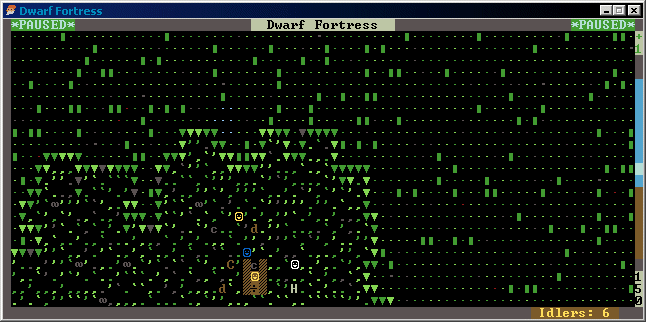
On the bottom left you can see a zone of grass with my smiling dwarfs and their wagon. All around, in the other zone, you see green dots and small blocks of green. The line separating these two zones is made by an arrow pointing down. As I said the small dots represent a lower level. So this means that if you go down one level you should be able to visualize that other part.
Let’s go *down*, one level. By pressing [Shift+>]:
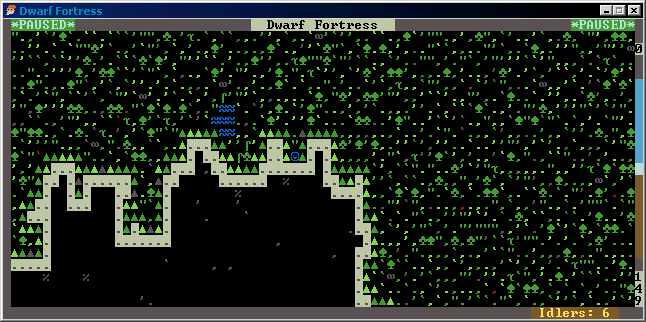
Here we are. The previous zone with the dwarfs is now in black with some gray dots and “%”. It represent underground terrain. We went down one level, so it makes sense that we are looking at the ground below where the dwarfs were, while on the rest of the screen we now see green characters, representing grass and trees (clubs and spades).
This means that the dwarfs were located in a upper level, like a small plateau. Till you see those arrows following the border, it means that the slope is walkable. So your dwarfs can move smoothly between these two levels without building ramps or stairways (in fact you can see a bluish smiling face in the middle of the second image, it’s my fisherman already on his way for that small pond to his left). You’ll also notice that the level where the dwarfs were, has only green/gray dots, so no trees. It means that if we want to cut down some trees our woodworker will have to move to that lower zone where there are plenty of trees.
Try experimenting a bit, moving up and down and trying to get familiar with the way the game visualizes things.
So now you should be able to pan the view around (arrow keys), go up down z-levels [shift+<], [shift+>], zoom back to origin [F1], and how to pause/unpause [Space]. These are all the commands you need to memorize, the rest will be shown on the default menu. Now we’ll see how to figure out what those weird ASCII characters represent. With [k] you “look around” (as you see in the menu). Pressing that key will activate an “X” yellow cursor. You move it around with arrow keys. Whatever will be under the cursor will be listed on the right panel. If one square has more than one object stacked, you’ll see it listed one under the other. This is the quickest way to figure out what’s what. For example see the first image, under the white smiley face there’s a gray “H”. If you move the cursor over it, you’ll see on the right panel that the “H” letter represents a “tamed stray horse”, with grass under it (obviously).
To exit EVERY screen, you press [Space]. Keep it in mind. It’s also the key pausing/unpausing the game, so pay attention.
The other important command after [k] to look what’s under the cursor is [v]iew units. Pressing [v] you also activate a similar yellow cursor, with the difference that it won’t show what’s under it, but the infos about the nearest unit. Usually everything that is “alive”. So pets, dwarfs, wild animals, monsters and so on. It’s not important to understand all the infos for now.
Now let’s present some basic concepts. In this game you don’t drive the dwarfs around. They are kind of autonomous and you don’t have to (you cannot) micromanage them. This makes sense because now you have seven dwarfs to manage, but as you access later phases in the game you can have huge fortresses with hundreds of dwarfs moving like ants. What you CAN do is set a list of jobs. The dwarfs will then complete these jobs depending on their own priority and skills. When you’ll dig your fortress you’ll tell them exactly where to dig, where to position doors and so on. They eat, sleep, drink, organize parties, make babies and rest all on their own. As long there are enough resources. If there’s booze, they drink booze, if there’s not booze, they drink water, and if they don’t have water, they die of thirst if you don’t have a river or a well near them. So your duty is to keep them happy and healthy. They’ll need beds to sleep, tables and chairs to eat. And obviously they need food and drinks.
There are two screens that let you track what the hell is going on. The first is [j]ob. You press [j] and you’ll see a list of dwarfs with what their are currently doing. Plus a list of jobs in the queue, waiting for a free or proficient dwarf, if you already set them. With the arrow keys you move through the list and with [c] you zoom to that dwarf. This helps to not lose your dwarfs around the place. You don’t know where the fisherman went? then you go in the [j]ob menu, select it and [c] zoom to it to see where he is. As always you exit this screen by pressing [Space].
The other screen is [u]nit. You press [u] and get a list of all your dwarfs (first) and then everything that is alive in the whole zone. There will be probably animals listed as well. So, as above, you can locate them by selecting one and then zoom to it by pressing [c]. This screen also list your dwarfs current action. So you can see at a glance what they are all doing. If some of them have no job, are sleeping, eating or resting.
Summary: [k] and [v] to look around. [j] and [u] to have a list of jobs.
Now, in order for your dwarfs to be able to do anything, you need to activate their jobs. For example if you want to cut trees, you need a dwarf with the “wood cutting” skill enabled. If you picked your skills correctly before embarking, you should have already a dwarf who can cut trees, already enabled. To be sure (and learn how to activate/disable jobs) let’s look into it. Press [u] for a list of units. You should see listed at least a dwarf in yellow. Select it (arrow keys), then zoom [c]. Now, in the right panel, you can toggle between four detailed screens that can be switched with the corresponding key. [g]en, [i]nv, [p]ref, [w]nd. Try to toggle between them. The first is general infos, like name, sex, job, skills. Then you have the inventory, preferences and health status (with locations). Go in the [p]ref tab, then press [l]labor. Here’s the list of possible jobs. If some of the jobs active in this screen correspond to one task in the job queue, then the dwarf will take the job and complete it.
Before you start doing anything you need to understand one UI quirk. In some cases you move through lists with arrow keys, in some cases you need to use [-] and [+] on the keypad, with [/] and [*] to scroll a full page.
In this case of the labor list, if you use arrow keys you’ll move the local cursor, not the jobs. So you may end up selecting a different dwarf. Instead to browse the job list you use [+] and [-]. With [Enter] to enable/disable them. If you want to *force* a dwarf to do one job only and make sure he doesn’t waste time doing something else, you can disable all other jobs. In this case, if the dwarf isn’t sleeping, eating, drinking, resting, dying or participating to a meeting or party (being all spontaneous action you can’t normally interrupt), he should go complete the job. Once you are used to this system you already have full control over your dwarfs. There isn’t much more to learn. You know how to set up your dwarfs, what is left is learn how to set up the jobs themselves.
—
Part 3
There are essentially three ways to set up jobs:
1- [d]esignations of areas (to mine, cut trees, gather herbs and more)
2- [b]uilding menu
3- Inside workshops
Always remember that [Space] is always the key to cancel an action or exit a submenu.
Let’s start from the first. A good first action is to start cutting trees to produce logs, that we’ll then use to craft other things. In the meantime, though, if you unpause the game you may see your fisherdwarfs already going to the nearest pond or river to catch fishes. Fishing doesn’t need to be set up as a job manually, if a dwarf has the “fishing” skill active (you can check if it is: [u]nit menu, [c] to zoom, [p]ref -> [l]abor, and page down to the fishing skill) then he will go fishing if he isn’t busy with something else. But let’s go back to our woodworker. You should have already one in your party, usually in yellow and ready to go. If you want to check if this skill is active on the dwarf, you follow the instruction I wrote above. The only other thing you need to know is if there’s an axe available. If you didn’t manually remove it from your inventory while organizing the expedition, then there should be one or two in your wagon. You could also check the [i]nventory of the dwarf, to see if he’s already carrying one. If there are no axes at all you are in trouble because you’ll need to fabricate or trade for one, and at this point it isn’t an easy task if you are starting to learn the game.
So we assume that one axe exists. In any case we are going to set up the job and then troubleshoot if the job doesn’t seem getting done. Next task is to find trees, obviously. This could be tricky because of a bad starting location. I’ve asked the programmer of the game to make some changes that will help getting through this part, but till those changes aren’t implemented either you find some trees around, or it’s better if you press [Esc], abandon the fortress and try to pick a different location, maybe a plain with a river in the middle and the biome confirming there are lots of trees. You need trees. Try to look around, go up and down levels to check if trees are lower in a still accessible area (it’s accessible if you see arrows pointing up or down on the border of the zone).
Once you find a zone with trees, reasonably close to where your dwarfs are idling, then we can start setting up the job (I suggest doing everything while the game is still paused). This is done from [d]esignations menu. After you pressed [d], you press “chop down [t]rees”. You should see that line highlighted in white and a familiar “X” yellow cursor on the local view. You move the cursor around with arrow keys as always. To select trees to cut you’ll select an area as large as you want, and all the trees inside that area will be flagged. To do this you use the [Enter] key. You press it once to select the point of origin of a rectangle, then move the cursor somewhere else on the map and press [Enter] again. There. All trees inbetween those two points should be now highlighted. If nothing is highlighted, either you failed the selection, or you are drawing the rectangle on a zone with no trees.
Assuming you designated some trees, you may notice that the job doesn’t appear on the [j]ob menu. But if you unpause the game for a short while, you should see your woodworker/carpenter moving to the trees, and on the [j]ob list a “Fell Tree” next to the dwarf name. If this isn’t happening then you either lack an axe, or made a wrong selection, or have no dwarf with the “wood cutting” skill enabled.
All designations work in a similar way, so if you have a miner and a cliff face near, you can [d]ig a tunnel in the same way you selected trees to cut. If you already unpaused the game you should see your woodcutter dwarf on duty, he goes near to one flagged tree, makes it blink and then transforms it into a log (underscore symbol), leaving it in the place where the tree was, then moving to the next one. After a while you should have all these logs scattered around the wilderness and it’s not easy to keep track of your resources without some organization. The next step is to set a stockpile so that all the logs will be put there instead of laying around randomly. So, to the stock[p]ile menu (press [p]). There are various kinds of stockpiles, some basic types but you can also create custom types to organize things exactly as you want. This will become important later on because you don’t want your dwarfs to pass all the time hauling stuff for long distance, so you should always plan things so that item types sit close to where they are needed and not at the opposite side of the map.
For now we need a [w]ood stockpile. And to make one the instructions are similar to designate trees to cut. You move the cursor and draw a rectangle that will be as large as you want the pile to be. After the area is designated, you should see gray “=” symbols delineating the area of the stockpile. Once you are done, press [Space] to exit the stockpile menu. Then [Space] again to unpause the game and observe what happens. The woodcutter himself or some of the other dwarfs with hauling jobs active should start moving logs (those brown “-” signs) to that stockpile.
Now that we have logs we have the material to build something, like chairs, tables, beds, doors. But of course we need a decent place where to put them. If you found a nearby cliff face and your miner is already active there, then you can proceed labyrinth-like, make a square-ish room and call it dining room. Just remember to not dig room too large (5×5, I think?) or the ceiling risks to crumble. But let’s assume instead that you don’t have any decent cliff face nearby to dig. So we dig down.
Pause the game again (to not lose track of things) or leave the woodcutter do his work while you go selecting your miner. He’s usually the smiling face in white or gray (depending on how you split jobs). The important part is to make sure that he has the “mining” job active ([p]ref -> [l]abor as, always) and a pick equipped or free to pick up. To be able to access a lower level you basically need a downward stairway [j] and an upward one [u]. One exactly below the other. So you enter the [d]esignations menu, press [j] for the downward stairway and press [Enter] two times anywhere on the grass nearby. When you move the cursor away or exit the designate menu (pressing [Space] as always) you should see a brownish “>” symbol (the color depends on the type of soil, I think). When you unpause the game the miner should go there and dig the hole/stairway. When done you enter the [d]esignations menu again, press [u] for the upward stairway, move the “X” cursor exactly in the position of the stairway we just built, press [Shift+>] to go down one level and without moving the cursor press [Enter] two times again. Without going back to the surface level, unpause the game and after a while you should see something looking like this (colors again depends on type of soil):

We can now start digging on this level. [d]esignations, press [d] for the “mine” option and then designate an area like a corridor. It should look like this:
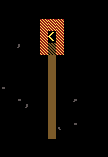
Pay attention to select also the border or the miner won’t be able to reach the area you designated. Then, you should see the miner appearing on this level once the game is unpaused, and start digging the corridor:
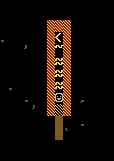
World is made of cheese, for you to carve. Once you know how to go down, you should also have plenty of space to dig. With some risks that you’ll learn to tackle (like hitting magma or flooding your fortress) and that goes outside the scope of this guide. For now you have some space to make some rooms, and use these rooms to soon outfit as dining rooms and bedrooms.
—
Part 4
We now have rooms, logs and what is left is to learn how to use those logs to make beds, for example. Intuitively you would go to the “site a [b]uilding” menu, select [b]ed… Only to see a red message saying “needs bed”. Oh yeah, we need a bed, isn’t it why we are trying to make one? No, because before you can “site a building” you have to make it, then you can site it. This is the process of using logs to make a bed and to do it we need the third case I listed above to set a job: the workshop.
To make a bed we need a “Carpenter’s workshop”, and, yes, this can be made through the “site a [b]uilding” menu. So press [b], then either scroll pages or lines (using [/*-+]), or directly press [w]orkshops. You will enter a submenu with all the workshops you can build. Here press [c] for the Carpenter’s one, and what is left to do is just put it somewhere with the cursor where there’s enough space for it (as long you actually have logs available).
Once placed, the workshop needs to be built by a dwarf. Here we learn a new key. [q] to inspect a building (both planned or already completed). This is another important key because it allows you to inspect all objects (including doors, tables, beds and so on) in the same way you use [v] to inspect living units. And in a similar way you move the cursor around and it will recognize the nearest object to it. Try it and move the cursor next to the Carpenter’s workshop you just plotted and in the right window you should see: “Waiting for construction…” and “Needs Carpentry”. The second line is the required job to have it built. So as long you have one of the dwarfs with the “carpentry” skill active (you know how to set it in any case) and the dwarf isn’t idle, you should see the dwarf moving to the log stockpile to take one log, and then to the workshop plot to start working. After a while the building will be complete and the dwarf moving back to his original position.
Reinspect the workshop. If complete you should see no messages on top, and new options at the bottom of the panel on the right. At this point things should start to be intuitive. Press [a] to add a new task. It will give you a list of objects (two pages of them) and here you can select and queue what you want to get built, by scrolling with [+] or [-], or pressing the corresponding shortcut.
This nearly complete the tutorial. You know the three ways to set up jobs (designations, build menu and inside workshops), how to set up the dwarfs themselves (selecting one, then [p]ref -> [l]abor and selecting active jobs) and how to designate stockpiles where to keep every kind of object (to change or customize stockpiles you inspect [q] them as with workshops). The game doesn’t end here, it begins here. But everything else will stack onto what you have already learned. Dwarf Fortress is a game where the fun is experimenting and failing, maybe in spectacular ways. Then try to do better on the next attempt.
This is also the philosophy of the game: losing is fun. It also means that you can’t reload savegames. The only way to do this is manually backup the whole “save” folder because whenever you want to exit the game (by pressing [Esc]) your current state will be saved. You can’t exit without saving.
For more detailed infos on specific aspects, there’s always the wiki.
—
Part 5
From this point you are on your own. Two other menus that can be useful are the [a]nnouncement one, where the game warns you about some special events, and [z] for a summary screen. For this screen you’ll notice that next to some resources you have a question mark:

This because past 10 stacks your dwarfs cannot track things, so you only see an estimation of the number of items. You’ll need specialized dwarfs to be able to see the details, and this possibility only comes later in the game. On the top row you also see submenus. For example in the “Kitchen” you can flag which type of plants you want to brew (for drinks) or which can be cooked.
Your priority in the game is to survive winter. If there’s a river it may freeze, and so preventing your fishermen to fish. To survive winter you need drinks and foods as consumables, and beds and dining rooms. In your wagon you should have already enough supplies to survive for a while, but it’s time to organize something.
Rooms:
Once you are digging, you can start planning for rooms. A dining room and bedrooms. Since dwarfs will pretend later on to have private bedrooms, it’s a good idea if you already plan things that way. I think a bedroom needs at least four spaces, where you are going to fit a door, a bed, a coffer and a cabinet (the bed obviously has the priority, just remember to reserve those four spaces). You build these through workshops, then place them physically in the room with the [b]uilding menu. Remember that for all these items you can also set important options, doors included. You can reserve single beds for a specific dwarf, so that he will always go there and consider it his private room. The same will happen for dining rooms, once you placed chairs and tables you can set their options by inspecting them [q].
Drinks:
One important rule: dwarfs don’t drink water, they drink booze. In previous versions of the game the first thing to make was a well for water. With the new version the well is almost an obsolete object and there are simpler ways to quench the thirst of your dwarfs. If they are out of booze, they’ll go to the river directly, but you shouldn’t be out of booze. If you have a zone with trees, you should also have bushes and plants to harvest (designating them like for cutting trees, just through the “gather [p]lants” option). You can use these resources in the “Still” workshop ([b]uilding menu -> [w]orkshops -> scroll to second page). To build the Still itself you’ll need a dwarf with the “brewing” or “plant gathering” job enabled (as it tells you if you inspect the plot). Then in the Still itself you should be able to queue up drinks.
Barrels:
Food rots if not put in a barrel and drinks need a barrel as well. Barrels [v] can be made in the carpenter workshop and you’ll need a lot of them.
Looking into barrels:
With [k] you look around. If you move the cursor on a barrel on a stockpile you’ll see just the barrel listed, but not what it contains. If you want to check if it’s empty or whatever is inside you can just scroll between the lines with [+-], select the barrel and press [Enter].
Hunting:
If you have an hunter the first thing to check is if the “hunting” skill is active ([p]ref >[l]abor), then if he’s set to use the right weapon. So go back to the [p]ref submenu and select [s]oldiering and hunting. Here you set which weapon to use (making sure there’s one of that type available). You can then set a stockpile for the animal corpses that the hunter will deliver. Pay attention that this isn’t a “food” stockpile. You’ll have to set a custom stockpile and then find the corpses sub-option, under “refuse”. If you build a Butchery (workshop) indoor, with a corpse stockpile next to it, you risk that those corpses will rot soon if not processed in the butchery quickly. And if they rot they’ll also produce purplish “miasma” that will spread around, making your dwarfs sick. A good idea is to put a door between that stockpile and the butchery so that the miasma will stay circumscribed, and keep a dwarf with the “butchery” job relatively free so that he can do the job soon enough for those corpses not to rot. Rotted corpses won’t be butchered, so they are wasted. Once an animal is butchered and the meat put in barrels, it should be safe and ready to be eaten. You can also add another process and prepare finer meals in the Kitchen (another workshop).
Farms:
Irrigation shouldn’t be a problem as in previous versions of the game. You’ll likely find an area with clay or sand where you can plot a farm without the need to irrigate it. Indoor and outdoor farms differ because you can plant only specific seeds outside and inside. You can plot one through the [b]uilding menu, then “farm [p]lot”. As you move the cursor pay attention because you don’t have to just place it, but also expand the area with the [umkh] keys. You’ll also need a dwarf with the “farming” skill enabled as always. After the plot is built, you can inspect it [q] and select the type of plant for that plot. You can cycle through the four seasons to set different types of plants, and you’ll need seeds to plant something. Obtaining seeds isn’t complicated. Whenever a plant is brewed or eaten raw, it will produce seeds. So if you are harvesting plants outside you’ll likely have some “wild strawberries” in your stockpiles, bu not their seeds. So you can go to the status menu [z], then “Kitchen” and here you can toggle off for brewery every plant that isn’t the wild strawberry, so that you can then queue a drink in the “Still” and make sure that the plant is used, and the seed produced. Once you have seeds you need to plant them, and then gather what comes out (it will take a while for the plant to grow). The jobs for this are “farming” and “plant gathering”. Pay attention about the type of soil. If you don’t have clay or sand, you’ll likely need irrigation, and I won’t explain it here. And if you do have clay or sand and farming outside pay attention to the location:
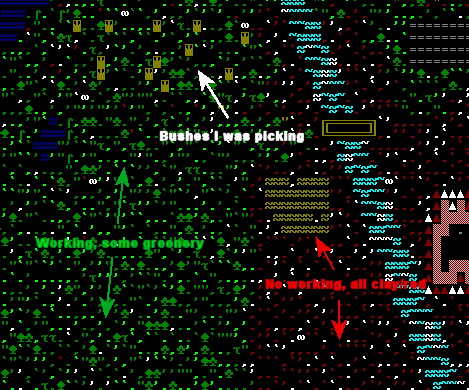
This images shows a possible problem, if you put the farm plot in a zone with just clay, then you won’t be able to use any seed on it because nothing can grow there. You need a zone where you see at least grass growing, further away from the mountain.
Init file:
Various options can be set in the /data/init/init.txt file. I just recommend to replace the lower section with the following one. It will help delivering prettier colors and not squint to see those (like the fisherdwarf) that in the original version are set too dark and almost invisible:
[BLACK_R:0]
[BLACK_G:0]
[BLACK_B:0]
[BLUE_R:13]
[BLUE_G:103]
[BLUE_B:196]
[GREEN_R:68]
[GREEN_G:158]
[GREEN_B:53]
[CYAN_R:86]
[CYAN_G:163]
[CYAN_B:205]
[RED_R:151]
[RED_G:26]
[RED_B:26]
[MAGENTA_R:255]
[MAGENTA_G:110]
[MAGENTA_B:187]
[BROWN_R:120]
[BROWN_G:94]
[BROWN_B:47]
[LGRAY_R:185]
[LGRAY_G:192]
[LGRAY_B:162]
[DGRAY_R:88]
[DGRAY_G:83]
[DGRAY_B:86]
[LBLUE_R:145]
[LBLUE_G:202]
[LBLUE_B:255]
[LGREEN_R:131]
[LGREEN_G:212]
[LGREEN_B:82]
[LCYAN_R:176]
[LCYAN_G:223]
[LCYAN_B:215]
[LRED_R:255]
[LRED_G:34]
[LRED_B:34]
[LMAGENTA_R:255]
[LMAGENTA_G:167]
[LMAGENTA_B:246]
[YELLOW_R:255]
[YELLOW_G:218]
[YELLOW_B:90]
[WHITE_R:255]
[WHITE_G:255]
[WHITE_B:255]
 Apparently there are still some who think certain books deserve to go in the fire.
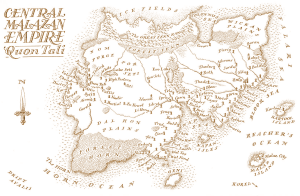 Steven Erikson shares the Malazan world with his friend and co-writer Ian Cameron Esslemont (ICE for short).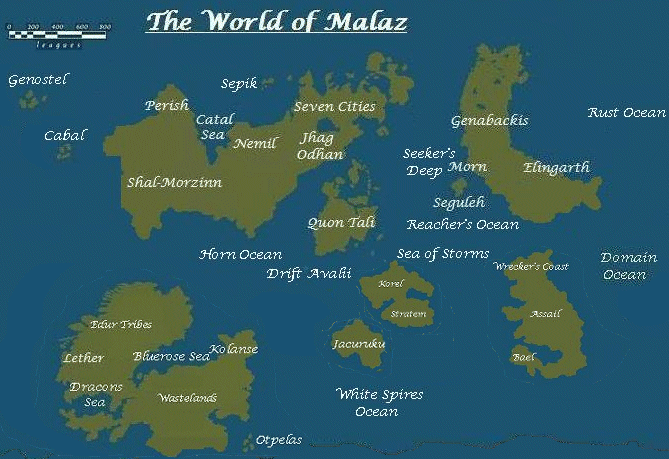
 I’m currently 250 pages into Robert Jordan’s “The Great Hunt” and liking it so much more than “The Eye of the World”.



 .
.